
More actions
Tiago199988 (talk | contribs) (Added device and PCB pictures) |
IamMyron07 (talk | contribs) |
||
| Line 14: | Line 14: | ||
<gallery showthumbnails="1"> | <gallery showthumbnails="1"> | ||
File:Iphone14promax-768x768.webp|alt= | File:Iphone14promax-768x768.webp|alt= | ||
File:Ip-14pm-fcam.png|alt= | |||
</gallery> | </gallery> | ||
Latest revision as of 15:29, 12 November 2025
| IPhone 14 Pro Max | |
|---|---|
| Manufacturer | Apple |
| Code name | A2894, A2651, A2893, A2895 |
| Release date | 2022-09-16 |
| Device type | Phone |
This article is a stub. You can help Repair Wiki grow by expanding it
Guides
Explanatory Guides
| Type | Difficulty | |
|---|---|---|
| IPhone Charging Circuit Diagnostics Guide | ||
| Parts that are serialized on iPhones | Troubleshooting/Diagnostics | |
| Which iPhones Will Boot With Top Board Only | Troubleshooting/Diagnostics | 1. Easy |
Repair Guides
| Affects part | Type | Difficulty | |
|---|---|---|---|
| Diagnosing iPhone “No IMEI / No Service” via RFFE Bus Analysis with ESP32 | Main Logic Board | Soldering | 3. Hard |
| How To Fix Important Display Message Even After Transferring Touch IC | Display | 3. Hard | |
| How To Fix an iPhone 14 Pro That Randomly Restarts | Main Logic Board | Part replacement | 1. Easy |
| How To Repair iPhone 13 to 16 pro max Proximity sensor not working | Proximity Sensor | 3. Hard | |
| How To Replace iPhone Front Camera Without Loosing FACE ID | TrueDepth Camera Assembly | 3. Hard | |
| How to fix iPhone 13 to 16 pro max Face ID | TrueDepth Camera | 2. Medium | |
| How to repair iPhone 12 pro to 14 pro max rear camera portrait mode not working | Rear Camera LiDar Sensor | 3. Hard | |
| IPhone 12 and Above WiFi IC Replacement & Activation | Main Logic Board WiFi IC | 4. Specialist | |
| IPhone 14 Pro Max No Touch | Logic Board | Soldering Teardown BGA | 4. Specialist |
| IPhone 14 Pro Max – No Modem Firmware After RF Layer Swap | Motherboard | Soldering | 3. Hard |
Create a Guide
Device pictures


PCB pictures
Please consider contributing pictures to this section!
Reference measurements (also schematics if available)
-
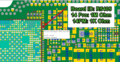
iPhone 14 Pro and Pro Max share the same top board, with only 1 resistor being different. This image shows where the Board ID resistor is located & what value it must be so it can be use for both iPhone 14 Pro and iPhone 14 Pro Max.
-

iPhone 14 Pro Max Charging Port USB C Readings


More Information/External Sources
You can manually link to external sources for additional information that might not fit here but are useful such as BIOS image dumps, firmware, etc!
Apple Self Repair Store
Repair Manual ID: XGTPKL