
More actions
IamMyron07 (talk | contribs) (Created page with "{{Repair Guide|Affects parts=Main Logic Board, NAND|Needs equipment=Hot Air Station, Soldering Iron, JCID Programmers, JCID Software|Difficulty=4. Extreme|Type=Soldering|Device=iPhone 6, iPhone 6S, iPhone 6S Plus, iPhone 7, iPhone 7 Plus, iPhone 8, iPhone 8 Plus, iPhone X, iPhone XS, iPhone XS Max, iPhone 11, iPhone 11 Pro, iPhone 11 Pro Max}} == Problem Description == When the original NAND of an iPhone is dead and replaced with a new chip, the device fails activation...") |
IamMyron07 (talk | contribs) |
||
| (3 intermediate revisions by the same user not shown) | |||
| Line 1: | Line 1: | ||
{{Repair Guide|Affects parts=Main Logic Board, NAND|Needs equipment=Hot Air Station, Soldering Iron, JCID Programmers, JCID Software|Difficulty=4. | {{Repair Guide|Affects parts=Main Logic Board, NAND|Needs equipment=Hot Air Station, Soldering Iron, JCID Programmers, JCID Software|Difficulty=4. Specialist|Type=Soldering|Device=iPhone 6, iPhone 6S, iPhone 6S Plus, iPhone 7, iPhone 7 Plus, iPhone 8, iPhone 8 Plus, iPhone X, iPhone XS, iPhone XS Max, iPhone 11, iPhone 11 Pro, iPhone 11 Pro Max}} | ||
== Problem Description == | == Problem Description == | ||
| Line 23: | Line 23: | ||
== Repair Steps == | == Repair Steps == | ||
=== Method 1: Traditional NAND Desolder & Programmer Write === | |||
# Remove Bad NAND: Desolder the original faulty NAND chip from the logic board. | # Remove Bad NAND: Desolder the original faulty NAND chip from the logic board. | ||
# Install & Flash New NAND: Solder new NAND, flash using iTunes/3uTools, confirm device boots (activation will still fail). | # Install & Flash New NAND: Solder new NAND, flash using iTunes/3uTools, confirm device boots (activation will still fail). | ||
| Line 39: | Line 40: | ||
# Reflash Device: Perform clean flash with iTunes/3uTools to finalize. | # Reflash Device: Perform clean flash with iTunes/3uTools to finalize. | ||
# Verify Activation: Boot and confirm device activates normally and Wi-Fi/Bluetooth work. | # Verify Activation: Boot and confirm device activates normally and Wi-Fi/Bluetooth work. | ||
=== Optional Faster Method: Purple Mode Direct Recovery (iPhone 8–X) === | |||
* After installing and flashing the new NAND once, you can boot the device into Purple Mode using iRepair 10 programmer.[[File:IRepair P10 Programmer.jpg|center|thumb|iRepair P10 Programmer]] | |||
* Use programmer software’s Recover SysCfg feature to directly pull original SysConfig data and write it to the new NAND without desoldering it again using purple mode.[[File:Query-raw-data.png|center|thumb|Query Raw Data - iRepair P10]] | |||
* Reflash the device and verify activation. | |||
* Advantage: Saves one full cycle of NAND rework and reduces thermal stress on pads. | |||
Latest revision as of 11:44, 21 September 2025
| How To Recover Original Sysconfig Data from iPhone | |
|---|---|
| Device | iPhone 6, iPhone 6S, iPhone 6S Plus, iPhone 7, iPhone 7 Plus, iPhone 8, iPhone 8 Plus, iPhone X, iPhone XS, iPhone XS Max, iPhone 11, iPhone 11 Pro, iPhone 11 Pro Max |
| Affects part(s) | Main Logic Board, NAND |
| Needs equipment | Hot Air Station, Soldering Iron, JCID Programmers, JCID Software |
| Difficulty | ◉◉◉◉ Specialist |
| Type | Soldering |
Problem Description
When the original NAND of an iPhone is dead and replaced with a new chip, the device fails activation due to mismatch of serial number, Wi-Fi MAC address, and Bluetooth MAC address.
This issue occurs because SysConfig data stored on the original NAND is missing.

Symptoms
- Device flashes successfully but fails at activation screen.
- Serial number may appear as “XXXXXXXX” or a random serial number will appear.
- Wi-Fi and Bluetooth may not function or show random MAC addresses.
- iTunes / 3uTools may show “Activation Error” or “Could not activate iPhone.” (See Figure 1)
Diagnostic Steps
- Flash iPhone with new new NAND using 3uTools or iTunes.
- Observe that phone boots to setup screen but does not activate.
- Check Serial / Wi-Fi MAC / BT MAC — mismatch or missing.
- Confirm there is no baseband or logic board fault before proceeding (baseband/nfc issue can also cause activation failure).
Repair Steps
Method 1: Traditional NAND Desolder & Programmer Write
- Remove Bad NAND: Desolder the original faulty NAND chip from the logic board.
- Install & Flash New NAND: Solder new NAND, flash using iTunes/3uTools, confirm device boots (activation will still fail).
- Remove New NAND: Desolder the new NAND from the board again.
- Read SysConfig:
- Launch JCID Software.
- Connect JC V1S Pro with respective NAND or JC P13/P15 Programmer module to PC.

Select programmer and click connect. - Insert NAND into programmer.
- Go to Programmer Interface → Query Info → Query Code/Unbind.
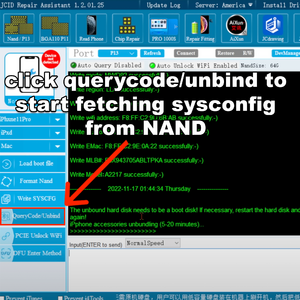
QueryCode/Unbind - JCID Repair Assistant - Wait (up to 30 mins) for software to retrieve original Serial, Wi-Fi MAC, BT MAC.
- Write SysConfig to NAND:
- Copy retrieved values.
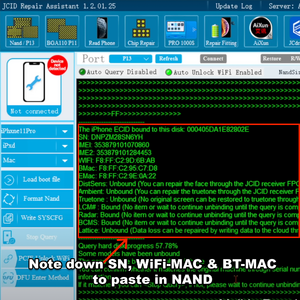
Note down SN, WiFi-MAC & BT-MAC - Paste values in respective fields.
- Click Write Selected Info in JC software to program data back into NAND.
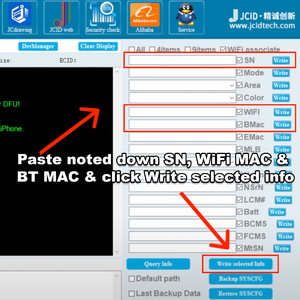
Paste and Write SN, WiFi-MAC & BT-MAC
- Copy retrieved values.
- Reinstall NAND: Solder NAND back onto logic board.
- Reflash Device: Perform clean flash with iTunes/3uTools to finalize.
- Verify Activation: Boot and confirm device activates normally and Wi-Fi/Bluetooth work.


Optional Faster Method: Purple Mode Direct Recovery (iPhone 8–X)
- After installing and flashing the new NAND once, you can boot the device into Purple Mode using iRepair 10 programmer.
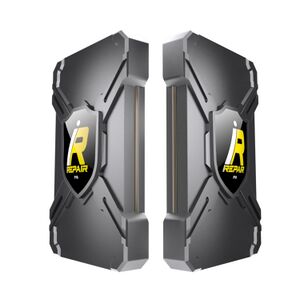
iRepair P10 Programmer - Use programmer software’s Recover SysCfg feature to directly pull original SysConfig data and write it to the new NAND without desoldering it again using purple mode.
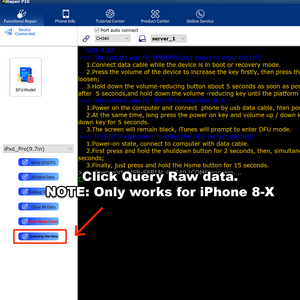
Query Raw Data - iRepair P10 - Reflash the device and verify activation.
- Advantage: Saves one full cycle of NAND rework and reduces thermal stress on pads.

