
More actions
| How To Repair a M Series MacBook Wifi Not Working By Replacing Wifi IC | |
|---|---|
| Device | MacBook Air A2337, Macbook Air A2681, Macbook Air A3113, MacBook Pro A2338, MacBook Pro A2442, MacBook Pro A2992 |
| Affects part(s) | Logic Board, WiFi IC |
| Needs equipment | Soldering Iron, Hot Air Station, LB WiFi IC, LB Programmer, LB Software |
| Difficulty | ◉◉◉◉ Specialist |
| Type | Soldering |
NOTE: Download LB Wifi OFF Software: https://fileoss.lbtool.net/webfile/lbtool-tool/LB-WIFI-OFF-1.0.0.zip
Problem description
On MacBook models with M-series chipset (M1/M2/M3/M4), Wi-Fi can stop working due to a failed Wi-Fi IC. Even after macOS reinstall, the machine may show “Exclamation Mark on Wifi Toggle” because the Wi-Fi IC is paired to the logic board via ECID binding. Replacing the IC requires unbinding and rebinding the Wi-Fi chip to the MacBook.
Symptoms
- Wi-Fi greyed out in macOS.
- "Exclamation mark" on WiFi
- Bluetooth may also fail in some cases.
- macOS reinstall, PRAM/SMC reset do not fix the issue.
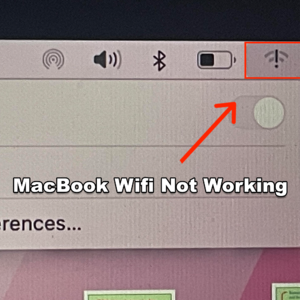
WiFi Not Working (Figure 1)

Diagnostic Steps
- Boot macOS → check if Wi-Fi toggle is unavailable.
- Enter System Information > Wi-Fi → confirm hardware not detected.
- Ensure issue is not antenna or connector related (inspect for corrosion/damage).
- Verify power rails to Wi-Fi IC are present. If power is correct but IC is still not enumerating, proceed with replacement & rebinding.
Repair Steps
Software Setup
- Install Luban software (LB-WIFI-OFF) using a pendrive.
- Launch Luban software with internet connection (mobile hotspot works).
- The software will unbind Wi-Fi and read the MacBook ECID automatically.

Successful WiFi Unbind - Verify in “About This Mac” that serial number is correct.
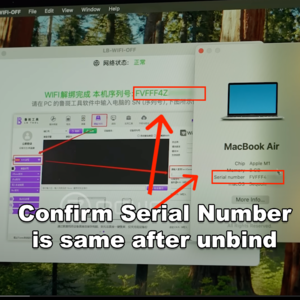
Verify Serial No. is same after unbind. - Shut down MacBook.


Board Work
6. Disconnect battery, remove logic board from chassis.
7. Remove Wi-Fi IC with hot air.

8. Clean solder pads using wick + flux until smooth.
Programming the Wi-Fi IC
9. Connect Luban programmer with Wi-Fi IC reading module.
10. Place Wi-Fi IC in the module.

11. Open Luban tool → wait for IC to be read.

12. Input the MacBook serial number (recorded earlier).
13. Click Check Now.

14. After verifying, Click Write Server Data.

15. Verify if written info (Serial) is correct.
16. Confirm write.

17. Wait for successful confirmation.
Reinstallation
18. Reball Wi-Fi IC with correct stencil.
19. Install IC back onto the logic board.
20. Clean with IPA, inspect under microscope.
21. Reassemble MacBook, reconnect battery.
Verification
- Boot into macOS.
- Wi-Fi should now be detected and toggle enabled.
- System Information should show Wi-Fi hardware with correct addresses.
- Connect to a Wi-Fi network and run stress test (download/upload).

WiFi fixed successfully.
