|Needs equipment=Soldering Iron, Hot Air Station, Microscope
|Type=BGA, Soldering
|Difficulty=4. Specialist
}}
==Problem description==
Samsung S22 Ultra has a common fault where it will give you a red exclamation mark warning when you plug in the charger.
If the device boots, it will say it's either very hot or very cold & it cannot charge & will shut down. This can happen out of nowhere.
S22 Ultra also does not require the wireless coil/back cover to prevent the temp warning, like some of the older models do. A fully working S22 Ultra will charge fine without the wireless coil/back cover.
[[File:S22 ultra temp warning.png|alt=Samsung S22 Ultra with a temperature warning when charging|thumb|Samsung S22 Ultra with a temperature warning when charging]]
This issue lies within the motherboard itself
==Symptoms==
*Does not charge
*Show red exclamation mark error message
==Solution==
===Diagnostic Steps===
[[File:S22 Ultra Connector Temp Sensor Line.png|thumb|Samsung S22 Ultra - Connector Temp Sensor Line that you must check for a short.]]
Check the 3rd pin form the top right of the charging port FPC (SOC25000). The line is called USB_THM (USB Thermistor) which is the temp sensor line for the board.
The known good reading should be 0.717V
[[File:S22 Ultra Connector Temp Sensor Line Drawing.png|thumb|Samsung S22 Ultra - Charging Connector Temp Sensor Line Diagram. ]]
If you get a low reading like 0.003V, then the line is shorted.
===Repair Steps===
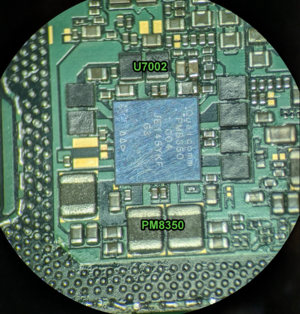
To repair the shorted USB_THM line, you must replace the U7002 IC. This is a PMIC inside the Samsung Sandwich.
[[File:U7002 diagram.png|alt=Samsung S22 Ultra - U7002 IC that needs to be replaced if USB_THM is shorted|thumb|Samsung S22 Ultra - U7002 IC that needs to be replaced if USB_THM is shorted]]
IC name is "Qualcomm PM8350"
This is extremely difficult to do, as the 2 layers are soldered together with lead free high temp solder.
Although, there are a few workarounds to get it to power on & allow you to extract the user data
# Boot from a DC Power Supply
# [[File:U7002.png|alt=Samsung S22 Ultra - Picture of U7002 IC that needs to be replaced if USB_THM is shorted|thumb|Samsung S22 Ultra - Picture of U7002 IC that needs to be replaced if USB_THM is shorted]]Boot with a fully charged battery.
Revision as of 06:15, 7 October 2024
How To Fix Samsung S22 Ultra With Red Temperature Warning Symbol
Samsung S22 Ultra has a common fault where it will give you a red exclamation mark warning when you plug in the charger.
If the device boots, it will say it's either very hot or very cold & it cannot charge & will shut down. This can happen out of nowhere.
S22 Ultra also does not require the wireless coil/back cover to prevent the temp warning, like some of the older models do. A fully working S22 Ultra will charge fine without the wireless coil/back cover.
Samsung S22 Ultra with a temperature warning when charging
This issue lies within the motherboard itself
Symptoms
Does not charge
Show red exclamation mark error message
Solution
Diagnostic Steps
Samsung S22 Ultra - Connector Temp Sensor Line that you must check for a short.
Check the 3rd pin form the top right of the charging port FPC (SOC25000). The line is called USB_THM (USB Thermistor) which is the temp sensor line for the board.
The known good reading should be 0.717V
Samsung S22 Ultra - Charging Connector Temp Sensor Line Diagram.
If you get a low reading like 0.003V, then the line is shorted.
Repair Steps
To repair the shorted USB_THM line, you must replace the U7002 IC. This is a PMIC inside the Samsung Sandwich.
Samsung S22 Ultra - U7002 IC that needs to be replaced if USB_THM is shorted
IC name is "Qualcomm PM8350"
This is extremely difficult to do, as the 2 layers are soldered together with lead free high temp solder.
Although, there are a few workarounds to get it to power on & allow you to extract the user data
Boot from a DC Power Supply
Samsung S22 Ultra - Picture of U7002 IC that needs to be replaced if USB_THM is shortedBoot with a fully charged battery.
File history
Click on a date/time to view the file as it appeared at that time.