
More actions
This article is a stub. You can help Repair Wiki grow by expanding it
| How To Read and Write iPhone 16 Pro SPI EEPROM using CH341A | |
|---|---|
| Device | iPhone 16 Pro, iPhone 16 Pro Max |
| Affects part(s) | Logic Board |
| Needs equipment | Soldering Iron, CH341A Programmer, Jumper Wire |
| Difficulty | ◉◉◉◌ Hard |
| Type | Soldering |
Description
Some iPhone 16 Pro and 16 Pro Max devices can develop charging-related or USB-C communication issues where the ACE charging controller is electrically functional, but its EEPROM (SPI) data becomes corrupted. This commonly occurs after the use of faulty or aftermarket chargers, power surges, or unstable power delivery.
In these cases, replacing the ACE controller alone does not resolve the issue, because the ACE EEPROM stores critical configuration data required for proper USB-C negotiation and charging behavior. When this data is damaged, it must be read, corrected, rewritten or replace the EEPROM physically.
This guide documents how to access and modify ACE EEPROM data in-circuit on iPhone 16 Pro and Pro Max, avoiding the need to split the sandwich logic board.

Symptoms
- Device does not charge via cable, but the port is confirmed good
- Intermittent or unstable charging detection
- Charging behavior changes depending on cable or power source
- Device does not charge even after replacing the ACE charging controller ==
Solution
- Replace ACE Charging controller
- Program a new ROM using CH341A programmer
- Charging will be restored
Diagnostic Steps
- Visual Inspection
- Look for signs of corrosion/Look for shorts around the ACE Charging Controller IC and ROM area
- Check for burnt ROM chips or ACE Charging Controller
- Voltage Testing
- Use USB-C power meter
- Plug in USB-C and check if iPhone negotiates proper voltage ==
Repair Steps
- Disconnect all power from the board
- Solder jumpers from CH341A to ACE SPI points
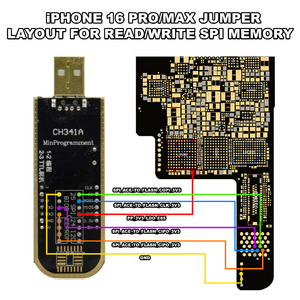
- Connect CH341A to PC
- Open CH341A Programmer
- Press Detect
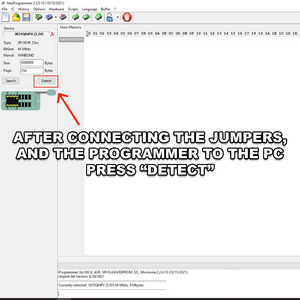
- Click Read
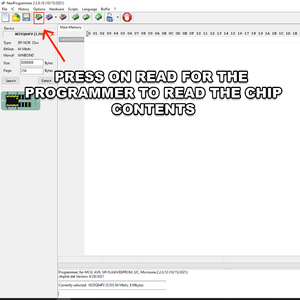
- Click Save. (Save at least two copies of the dump)
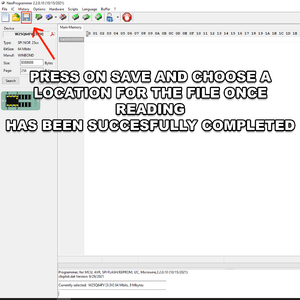
- Read again and compare files for consistency


Write / Restore Procedure
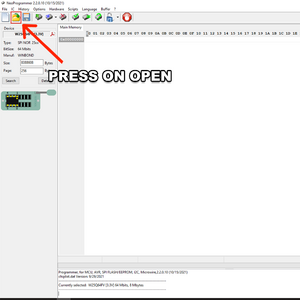
- Click Open
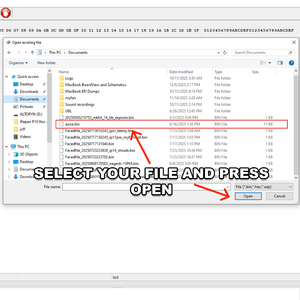
- Select your file and press open
- Click Program
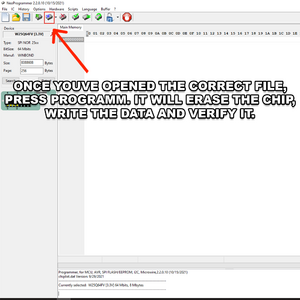
- Confirm verification passes with no errors


After Programming
- Disconnect CH341A
- Remove jumper wires
- Inspect pads for bridges
- Reconnect battery
- Power on device and confirm charging works.
Why This Method Is Used
- Preserves customer data
- Avoids sandwich board separation
- Reduces mechanical and thermal risk
- Faster and safer EEPROM access
- Uses inexpensive, widely available tools