
More actions
| How To Fix an iPhone 14 that is shows temperature warning and does not charge | |
|---|---|
| Device | iPhone 14 |
| Affects part(s) | Main Logic Board |
| Needs equipment | Microscope, Soldering Iron, Hot Air Station |
| Difficulty | ◉◉◉◉ Specialist |
| Type | Soldering |
Problem description
iPhone 14 shows temperature warning when powered on. Device charges normally while powered off but does not charge when turned on. Severe overheating occurs once the phone boots.
Symptoms
- Temperature warning appears after boot.
- Phone charges when powered off, but not when powered on.
- Device overheats rapidly while powered on.
- On DCPS: pre-boot draw ~1A before prompt to boot, then device boots normally.
Diagnostic Steps
- Connect to DCPS and observe current draw – confirm abnormal 1A draw before prompt to boot.
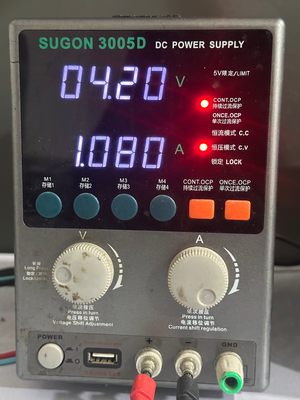
Figure 1 - Example of 1A of consumption before prompt to boot - Check with thermal camera – locate rapid heating component.
- Identify shorted capacitor on SPKRAMP_TOP_VBOOST line.
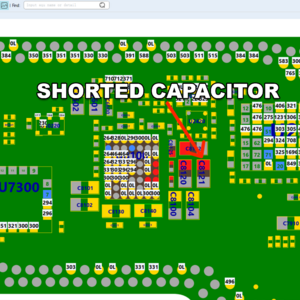
Figure 3 - Shorted Capacitor on SPKRAMP_TOP_VBOOST line shown on Boardview 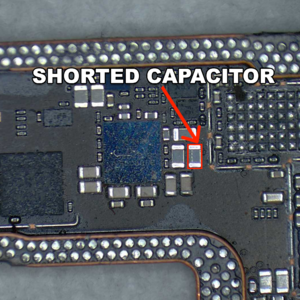
Figure 2 - Shorted capacitor on SPKRAMP_TOP_VBOOST line


Repair Steps
- Remove motherboard from housing, split layer and perform resistance measurement on SPKRAMP_TOP_VBOOST rail.
- Confirm low resistance indicating short.
- Identify and remove the shorted capacitor from the rail.
- Recheck resistance to confirm short is cleared.
- Reassemble device and test boot with DCPS – ensure pre-boot current draw normalizes.
- Power on phone and check charging behavior – should now charge normally without temperature warning.
- Verify device stability under load (charging + usage) before closing repair.
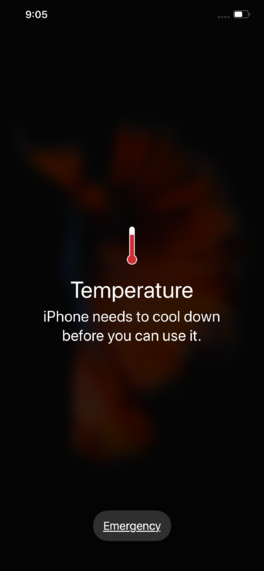
Figure 1 - Example of Temperature warning on iPhone
