
More actions
| How To Turn On iPhone 14 to 16 Plus lower layer | |
|---|---|
| Device | iPhone 14, iPhone 14 Plus, iPhone 15, iPhone 15 Plus, iPhone 16, iPhone 16 Plus, iPhone 16e |
| Affects part(s) | Logic Board |
| Needs equipment | |
| Difficulty | ◉◉◉◉ Specialist |
| Type | Soldering |
Problem description
On newer iPhone models (14/Plus and above), the logic board is made of two sandwiched layers (upper + lower) and the CPU is on the lower layer. When troubleshooting short circuits on VDD_MAIN or other lines, technicians often separate the board to isolate and repair the issue.
However, after clearing the short, you may need to boot only the lower layer to confirm that the board is functional before reballing . Since the upper layer (with power button & interposer connection) is removed, you need a manual method to simulate power-on.
Syptoms
- Device has a short on VDD_MAIN/VDD_BATT → board split to isolate.
- After repairing the short, phone does not auto-boot on lower layer.
- Need a way to trigger boot for testing.
Repair Steps
- Power Setup Connect 4.2V from DC Power Supply (DCPS) to: Positive lead → VDD_MAIN/VDD_BATT pad on lower board. Negative lead → Ground pad.
- Locate Power Button Pin Identify the Power Button pin on the interposer connector of the lower board.
- Simulate Power Press Use tweezers to short the Power Button pin to Ground momentarily. This mimics pressing the physical button.
- Confirm Boot current draw on DCPS: If phone enters OS, lower layer repair is successful.
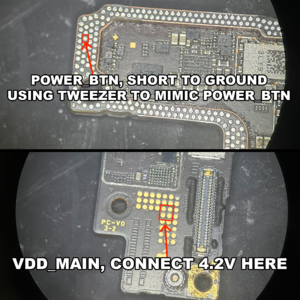
iPhone 14 / Plus 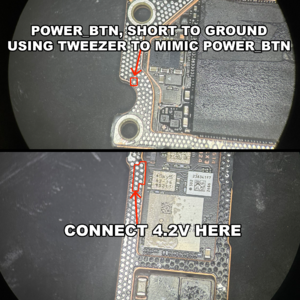
iPhone 16 / Plus 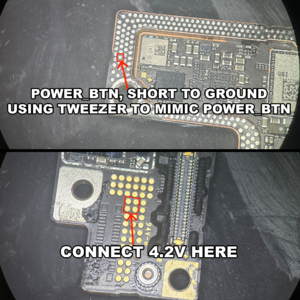
iPhone 15 / Plus


