
More actions
This article is a stub. You can help Repair Wiki grow by expanding it
| How To Repair Nintendo Switch WiFi Not Working | |
|---|---|
| Device | Nintendo Switch Lite |
| Affects part(s) | Logic Board |
| Needs equipment | Hot Air Station, Soldering Iron, Tweezers, Reballing Stencil |
| Difficulty | ◉◉◉◉ Specialist |
| Type | Soldering |
Problem description
Nintendo Switch Lite shows error 2110-1118, cannot connect to WiFi, no networks appear, or WiFi toggle is greyed out.
This fault commonly occurs due to:
- Failed WiFi IC (Broadcom)
- Missing / knocked-off resistors next to the USB-C port after a previous repair.


Symptoms
- WiFi toggle missing or greyed out
- “Error Code: 2110-1118” when searching for networks
- No networks detected
- Bluetooth may also be affected (shares the same IC)
- Issues appear immediately after board repair (port replacement, power IC work, etc.)
Solution
Diagnostic Steps
1. Software Ruling-Out
- Try factory reset (no data loss) → Settings → System → Formatting Options → Reset Cache
- Try full initialize (if customer approves)
- If WiFi toggle is missing: hardware fault confirmed

2. Visual Inspection (Board Level)
- Inspect the board area around USB-C
- Look specifically for knocked-off resistors near the area circled in the provided image
- Inspect WiFi IC for:
- Overheating marks
- Reflow attempts
- Physical damage
- Cold solder pads
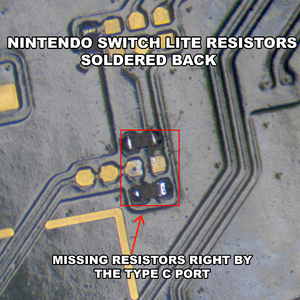
Nintendo Switch Lite - Missing Resistors Soldered Back

Repair Steps

Case 1 — WiFi IC Replacement
1. Remove Old WiFi IC
- Preheat board
- Lift carefully to avoid pad damage
2. Install Donor WiFi IC
- Important: Only use an original IC pulled from a donor Switch Lite
- Reball
- Align and reflow
- Inspect for bridges under microscope
3. Testing
- Reassemble partially
- Power on → WiFi toggle should appear immediately
- Connect to network to confirm functionality
Case 2 — Replace Missing Resistors Near USB-C
Common Fault
- One or more of the 4 tiny SMD resistors near the USB-C port are missing
- Usually damaged during USB-C desoldering
Steps
- Clean area with flux
- Inspect pads for ripping
- Replace missing resistors
- match values from donor board
- Microscope inspection for bridges or cold joints
- Reassemble and test WiFi
- WiFi should function properly