
More actions
This article is a stub. You can help Repair Wiki grow by expanding it
| Galaxy A125 (Mediatek) Not Booting | |
|---|---|
| Device | |
| Affects part(s) | |
| Needs equipment | |
| Difficulty | |
| Type | |
Problem description
The device does not boot and has no response to anything then you could have this issue.
Symptoms
- Low booting when promted to boot( 0.030 - 0.050 mA)
- Consumes power only when power buttons is pressed and goes to 0.000 as soos as you release it.
- Connect to pc and does nothing
- VPH_PWR voltage is stable
- Buck voltage is not stable
Diagnostic Steps
- On the wall charger the consumption is under 0.00-0.02 A
- Check for VPH_PWR if its available and stable(3.6-4.2v)
- Check buck voltage with charged battery + charger plugged in (if its not stable then you could have this issue)
- Check VUSB_PMU_CAP diode value to make sure if you have the same exact issue to proceed for repair (should not be 0.000)
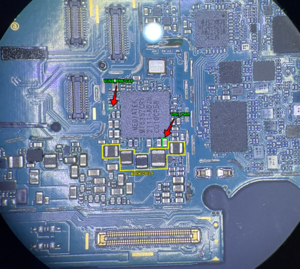
Initial Checking

Repair Steps
This problem occurs due to internal damage in the cpu. This issue is repairable and you should follow the steps below.:
- Remove the PMIC MT6357CRV
- Check the pad #J14 (VUSB_PMU) if its shorted after removing the PMIC (if the pad is not shorted after removing the PMIC then just replace the PMIC.)

- If its still shorted then cover it with some uv mask
- Reball and reinstall the power ic
- Your phone should start working again