
More actions
| IPhone 13 Pro/ Pro Max No Touch Probelem | |
|---|---|
| Device | IPhone 13 Pro, IPhone 13 Pro Max |
| Affects part(s) | Logic Board |
| Needs equipment | Soldering Iron, Hot Air Station, Microscope |
| Difficulty | ◉◉◉◉ Specialist |
| Type | Soldering, Teardown, BGA |
This article is a stub. You can help Repair Wiki grow by expanding it
Problem description
iPhone 13 pro/ pro max boots normally but touchscreen does not respond at all. Display shows image, but there is no touch input on the entire panel. Replacing the screen does not fix the issue.
Symptoms
- Touchscreen not responding at all
- Screen replacement does not fix the problem
- GR on display connector is normal
Solution
The problem generally is due to a faulty capacitor that is placed on the touch boost line. Replacing the capacitor C8901and (8903 only in iPhone 13 pro max)(according to JC Drawing) fixes the issue.


Diagnostic Steps
- Check diode values on the connector, if you see any unusual reading trace it or else continue to the next step if all diode values are good.
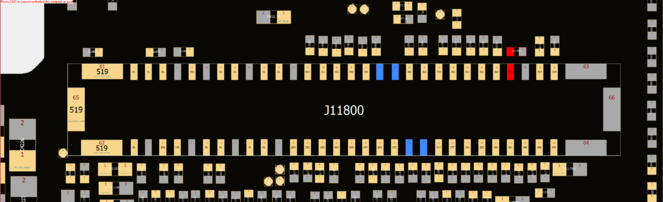
Diode value - Check for voltage on the PP5V1_TOUCH_VDDTX_S2:
- You cannot normally check voltage on this line

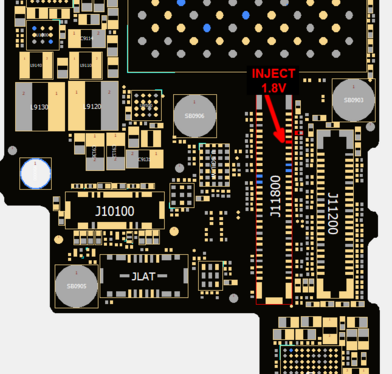
Schematic - In order to check voltage on this line you have to manually enable the ic by giving it an enable signal and here is how to do it:
- Plug the DCPS cable/ battery to the phone 3.8-4.2 volts
- Inject 1.8v at lowest possible Ampere on pin #49(according to JC DRAWING) to enable the LDO output
INJECT 1.8V - Check the output voltage on pin #54(according to JC DRAWING)
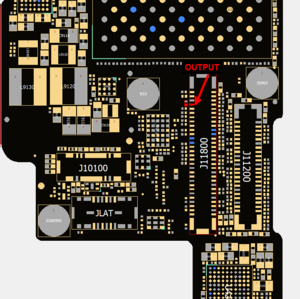
Output of Display Boost IC - If you get no voltage output then proceed to the repair steps
- You cannot normally check voltage on this line


Repair Steps
- Split the board in half
- Check the capacitor C8901+(C8903 only in 13 pro max), if shorted it MUST be replaced.
NOTE: (if you don't replace this capacitor phone will still have no touch problem)
- Recheck for shorts
- In some rare cases of which short is not cleared:
- You have to replace the u8900
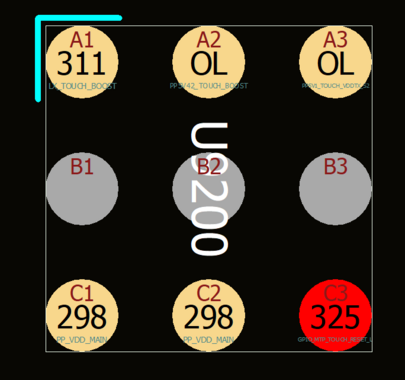
Diode Value Under ic - Check diode value under the ic before replacing it
- Replace the ic and the capacitor
- You have to replace the u8900
- Test the touch function, it should be restored.
