
More actions
Tiago199988 (talk | contribs) (Added device and PCB pictures) |
Tiago199988 (talk | contribs) (added code name) |
||
| Line 2: | Line 2: | ||
|Manufacturer=Microsoft | |Manufacturer=Microsoft | ||
|Device type=Game Console | |Device type=Game Console | ||
}} | |Has code name=Edmonton}} | ||
{{stub}} | {{stub}} | ||
Revision as of 14:28, 6 September 2025
| Xbox One S | |
|---|---|
| Manufacturer | Microsoft |
| Code name | Edmonton |
| Release date | |
| Device type | Game Console |
This article is a stub. You can help Repair Wiki grow by expanding it
Guides
Explanatory Guides
| Type | Difficulty | |
|---|---|---|
| Diagnosing HDMI Port issues using Pairs and Patterns technique | Troubleshooting/Diagnostics | 1. Easy |
| Xbox Fault Finding Using I2C | Troubleshooting/Diagnostics | 2. Medium |
Repair Guides
| Affects part | Type | Difficulty | |
|---|---|---|---|
| Xbox One S No Power | Motherboard PSU | Soldering | 3. Hard |
Create a Guide
Device pictures

PCB pictures


Reference measurements (also schematics if available)
-
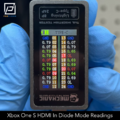
Xbox One S HDMI In Mechanic T-824 Tail Insertion Tool Diode Mode Readings
-
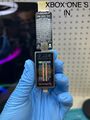
Xbox One S HDMI INPUT Port Diode Mode Readings through Mechanic T-824 Tester


More Information/External Sources
You can manually link to external sources for additional information that might not fit here but are useful such as BIOS image dumps, firmware, etc!