
More actions
(Added device page and uploaded mechanic usb C tester reading) |
No edit summary |
||
| Line 1: | Line 1: | ||
{{Device page | {{Device page | ||
|Manufacturer=Apple | |||
|Has code name=A3113 | |||
|Device type=Laptop | |||
}} | }} | ||
{{stub}} | |||
== Guides == | == Guides == | ||
Revision as of 21:37, 14 May 2025
| Macbook Air A3113 | |
|---|---|
| Manufacturer | Apple |
| Code name | A3113 |
| Release date | |
| Device type | Laptop |
This article is a stub. You can help Repair Wiki grow by expanding it
Guides
Explanatory Guides
Repair Guides
| Affects part | Type | Difficulty | |
|---|---|---|---|
| How To Repair a M Series MacBook Wifi Not Working By Replacing Wifi IC | Logic Board WiFi IC | Soldering | 4. Specialist |
| Macbook Air A3113 Trackpad and or Keyboard not working | Trackpad | Part replacement Cleaning | 2. Medium |
Create a Guide
Device pictures
Please consider contributing pictures to this section!
PCB pictures
Please consider contributing pictures to this section!
Reference measurements (also schematics if available)
-
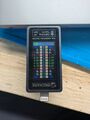
Macbook Air a3113 Mechanic USB-C readings (same on both ports)
