
More actions
No edit summary |
(added USB-C readings) |
||
| Line 20: | Line 20: | ||
== Reference measurements (also schematics if available) == | == Reference measurements (also schematics if available) == | ||
<gallery showthumbnails="1"> | <gallery showthumbnails="1"> | ||
File: | File:A2289.jpg|Macbook Pro a2289 Mechanic USB-C readings (same on both ports | ||
</gallery> | </gallery> | ||
== More Information/External Sources == | == More Information/External Sources == | ||
You can manually link to external sources for additional information that might not fit here but are useful such as BIOS image dumps, firmware, etc! | You can manually link to external sources for additional information that might not fit here but are useful such as BIOS image dumps, firmware, etc! | ||
Revision as of 21:34, 14 May 2025
| MacBook Pro A2289 | |
|---|---|
| Manufacturer | Apple |
| Code name | A2289 |
| Release date | |
| Device type | Laptop |
This article is a stub. You can help Repair Wiki grow by expanding it
Guides
Explanatory Guides
Repair Guides
| Affects part | Type | Difficulty | |
|---|---|---|---|
| MacBook Pro A2289 No Backlight on Display repair | Motherboard | Soldering | 3. Hard |
| MacBook Pro A2289 No camera detected repair | Motherboard Camera Display assembly | Soldering | 3. Hard |
| MacBook Pro A2289 No post, boot, or image with initial fan spin, drawing 0.2A at 20V repair | Motherboard Camera Display assembly | Soldering | 3. Hard |
| MacBook Pro A2289 Not turning on, 0.01A current draw at 5V repair | Motherboard | Soldering | 3. Hard |
| MacBook Pro A2289 Not turning on, drawing 0.03-0.06A at 20V repair | Motherboard | Soldering | 3. Hard |
| MacBook Pro A2289 Not turning on, fluctuating current draw 0.03-0.1A at 20V repair | Motherboard | Soldering | 3. Hard |
| MacBook Pro A2289 Not turning on, ~0.23-0.31A current draw at 5V repair | Motherboard | Soldering | 3. Hard |
| MacBook Pro A2289 Touchbar brightly flashes following shut down or login repair | BridgeOS/T2 | Part replacement Software | 2. Medium |
| MacBook Pro A2289 not booting, 20V at 0A current draw | Motherboard | Soldering | 3. Hard |
Create a Guide
Device pictures
Please consider contributing pictures to this section!
PCB pictures
Please consider contributing pictures to this section!
Reference measurements (also schematics if available)
-
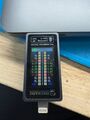
Macbook Pro a2289 Mechanic USB-C readings (same on both ports

More Information/External Sources
You can manually link to external sources for additional information that might not fit here but are useful such as BIOS image dumps, firmware, etc!