Soldering iron, Hot Air Station, Microscope, Tweezer
Difficulty
◉◉◉◉ Specialist
Type
Soldering
Problem description
An iPhone 16 Pro/Max presented with persistent bootlooping on the Apple logo. Standard fixes such as flashing firmware and replacing the battery did not resolve the issue. Further board-level diagnostics revealed a failure on the Analog_BATT_VCELL_POS_CONN line traced back to the U4200 USB/Charging IC. Replacing the IC successfully restored functionality.
apple logo bootloop
Symptoms
Device stuck bootlooping on Apple logo
Device does not charge when connected to power
Occasionally boots up normally but remains unstable
Diagnostic Steps
Replace Battery – Installed a known-good battery (no improvement).
Flash iOS – Attempted restore/flash in DFU and Recovery mode (device still bootloops).
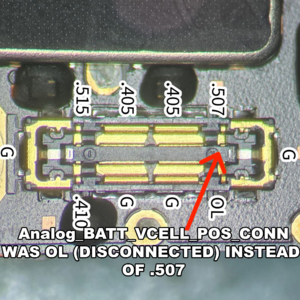
Measure Battery Connector – Found Analog_BATT_VCELL_POS_CONN line showing OL (open line).battery fpc OL
Trace Line – Followed the line from battery connector through PCB layers:
OL present even on lower PCB layers → rules out board-layer damage.
Only other connection point is U4200 USB/Charging IC.
u4200 ic
Repair Steps
Remove logic board and isolate U4200 IC area.
Apply flux and controlled hot air rework to safely remove U4200.
Clean pads and inspect for pad damage or corrosion.
Install new U4200 USB/Charging IC with proper alignment.
Reflow and allow the board to cool, then inspect solder joints.
Reassemble device partially for testing.
Re-measure Analog_BATT_VCELL_POS_CONN at battery connector:
Reading returned to normal continuity.
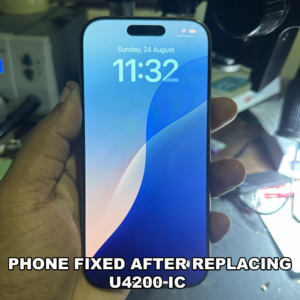
Boot test – Device powers on normally, no more bootlooping.
phone successfully booted up to homescreenFinalize assembly, perform full charging and stability tests.