
More actions
| Samsung Galaxy A13 5G(A137) Not Charging | |
|---|---|
| Device | Galaxy A13 5G |
| Affects part(s) | Logic Board |
| Needs equipment | Soldering Iron, Hot Air Station, Microscope |
| Difficulty | ◉◉◉◉ Specialist |
| Type | Soldering, BGA |
This article is a stub. You can help Repair Wiki grow by expanding it
Problem description
You have a phone that does not charge but it works with charged battery. It could have happened due to faulty charger/short on cable or something similar.
Symptoms
- Phone does not charge at all
- No charging logo on top(near battery)
- Does not connect to PC
- Burned charging port
- Customer said happened with bad charger/usb cable
Diagnostic Steps
This is how to diagnose and repair the no charging fault:
- Check if these diode values on fpc are ok.

- ALL OF THE VOLTAGE CHECKINGS BELOW SHOULD BE DONE ONLY BY INSERTING A CHARGER AND NOT A BATTERY. IF YOU WANT TO CHECK GR SHOULD BE WITHOUT ANY SOURCE OF POWER(CHARGER OR BATTERY)


- Check for 5v input in the VBUS IN capacitor:
- if ok then check check on VBUS IF FL(bypassable coil):
- If voltage is ok then skip the next step
- if ok then check check on VBUS IF FL(bypassable coil):
- If no voltage in VBUS IF FL then you most likely have a fused OverVoltage Pritection ic. There are 2 ways to fix it.
- Change the OVP IC with a similar one.
- You can bypass it but by bypassing it you will have higher risk to damage a chaging ic in future because of faulty chargers/cables.
- Bypass the OVP IC: remove the OVP IC and make the same exact jumper(short VBUS IN to VBUS IF) shown in the picture below
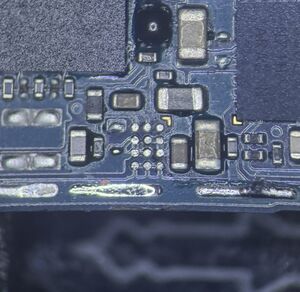
removed ovp ic


- Check for Voltage on VPH COIL(3.7-4.2v) Should have stable voltage and no fluctuation.
- If voltage is not stable then check GR of VPH COIL, if okay then the problem could be the charging ic(replace charging ic)
- Check for GR and voltage on BOOTCAP
- Should have 3.7-4.2v in one side and the other side should have almost the double voltage of it
- if it doesn't then you could have a faulty bootcap or faulty charging ic.
- Check for faulty BOOTCAP: probe both sides of bootcap and check for short, if does not show low gr then its considred ok.
- Note: If you have a faulty bootcap then the problem you will most likely face is fake charging.
- Your problem should be solved by replacing charging ic.