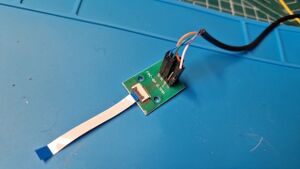
FPC test board (8 pin 0.5 mm), FPC cable (8 pin 0.5 mm forward), USB cable (with or without Dupont pins - female), Multimeter, (optional: Soldering Iron)
Difficulty
Type
Hardware"Hardware" is not in the list (Soldering, Teardown, Part replacement, Cleaning, Software, BGA, General) of allowed values for the "Repair Guide type" property.
"Easy" is not in the list (1. Easy, 2. Medium, 3. Hard, 4. Specialist) of allowed values for the "Repair Guide difficulty" property.
Problem description
If there is an issue with the controls of the Steam Deck and you are uncertain if it comes from the controller board or the mainboard, you can connect your controller board(s) (at the FPC connector) to the PC via a USB to FPC adapter (see. figures 1-3) to test their functionality. To build a USB to FPC adapter this you need the following:
Figure 1: USB to FPC adapter
You need:
USB Cable (male to Dupont female; or just solder it to the test board) - I crimped my own out of a broken USB cable, but you can also buy those online (e.g. this one aliexpress.com/item/1000007049130.html).
FPC test board (8 pin, 0.5 mm pitch) - i bough those from Aliexpress
FPC cable (8 pin, 0.5 mm pitch, forward/contacts facing the same direction) - Also bought from aliexpress
Pin headers (alternatively you can just solder the USB cable to the FPC test board)
Multimeter
Figure 2: USB to FPC adapter(optional: soldering iron, if you want to solder the USB cable to the test board)
Assembly
Figure 4: Controller board detected as USB deviceFigure 5: Controller board detected by Steam as Controller (you can run controller test here)
Pinout is the following (numbering according to the fpc test board): Pin 1 or 2: +5V; Pin 3, 6 or 7: GND ; Pin 4: D-; Pin 5: D+. Check the usb pinout of your USB to FPC adapter before connecting to the controller board. Plug the USB Cable to your computer (without the controller board attached) and check if you get +5V on the correct pin of the controller board. +5V needs to be connected to one (or both) oft the leftmost two pins on the fpc test board. If you connect +5V to to one of the data-pins or the "key/..." pin, it is possible that you fry the board. Unplug the usb connector from your computer and connect the fpc cable to the controller board. Check your ground pin is connected to the Ground of the controller board (e.g. by probing the exposed copper near the screw holes).
Diagnostic Steps
Once you confirm, that the pinout is correct, connect the usb cable to your computer. You should see the controller boad being detected as a USB device by running "lsusb" (on linux) in terminal (figure 4) and as a controller ("Steam Deck Controller") being detected by Steam (figure 5).
Should your board not be detected, try to swap pins D+/D- and write me a mail if it works, so I will correct this guide.
Note: If you just connect one or two of the controller-boards without the touchpads, buttons or joysticks attached, your mouse will move by itself. The Controller is switched to Mouse/Keyboard input mode and sends mouse movement data to your computer. Feel free to research the reason for this and write a post in the repair wiki how this relates to defective input devices on the Steam Decks controller.