
More actions
This article is a stub. You can help Repair Wiki grow by expanding it
| IPad Air 4 No Backlight | |
|---|---|
| Device | |
| Affects part(s) | |
| Needs equipment | |
| Difficulty | |
| Type | |
Problem description
iPad Air 4 will turn on and make noises but appear to have no output to the screen unless a light is held up to the display.

Symptoms
- iPad Air 4 turns on but appears like the screen will not turn on
- If you shine a light on the display especially while powering on the ipad you'll be able to see a faint apple logo or other sign that the screen is working but the backlight is not
Diagnostic & Repair Steps
- The first step would be to test with a known good display as sometimes the LCD itself can be the cause of having no backlight. It would also help if you are still getting no backlight to put a bit of pressure on the screen connector which will help rule out a broken LCD FPC connector some of the time.
- If a bit of pressure on the connector gets the backlight to come back you can sometimes fix it by carefully bending the outside walls of the FPC inwards. If done correctly the LCD should snap in to the connector much tighter
- The next step would be to use a multimeter to test the FPC and make sure all readings are within normal. Put your multimeter in diode mode and place the red probe on ground and use your black probe to measure each pin of the LCD FPC, then compare them to the readings below:
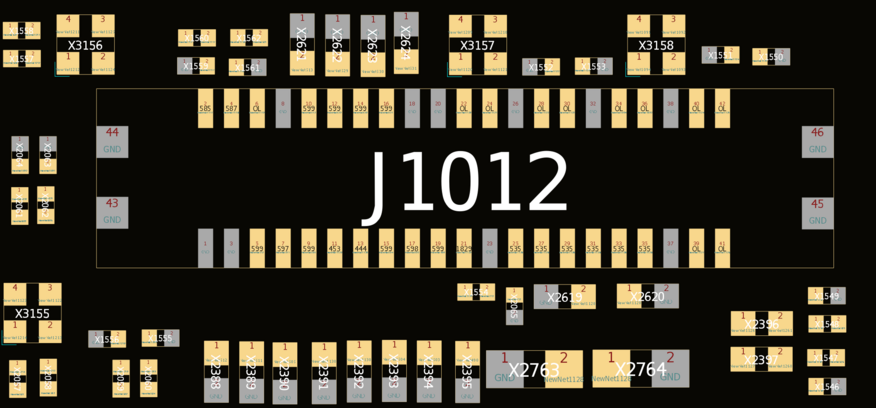
Figure 2. LCD FPC connector diode mode readings from boardview

- If you find a reading to be a large difference from what the readings show in figure 2, then you'll need to check whatever is connected to that pin for damage. Most times you'll find pins 11 & 13 to be off, but even if they read similar to what is shown in figure 2 and you've found no other bad lines we'll focus on what's connected to these pins.
- In figures 3 & 4 below we can see where this lines goes, the most common thing to fail is going to be the filter that the line is connected to. You'll have to use low melt solder around the edge of the shield that covers it and then a hot air gun to finally pull the shield off, or the much easier way is to use a grinder/dremel tool to cut a hole in the shield in order to get to the filter. If this filter is burnt or otherwise has no continuity then you'll need to replace it.
- You can either pull the filter from another donor ipad air 4 or use about any other backlight filter that is the same size commonly stocked by major distributors.
- Sometimes the filter will burn straight through the board and in order to replace it you'll have to dig into the board with a grinder or knife to find the trace in order to attach it to the new filter or run a jumper wire from one or both sides of the new filter to the line on the FPC or capacitors that was burnt and missing.
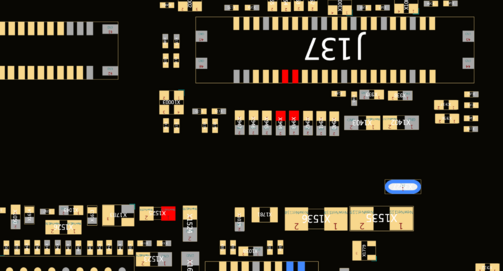
Figure 4. Boardview showing right side of backlight filter and what it connects to 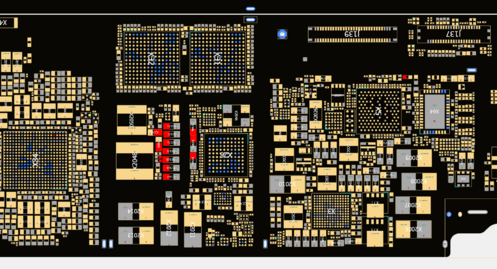
Figure 3, boardview showing left side of backlight filter and where this line connects to


- If the backlight filter has continuity from one side to the other then you'll want to check for shorts on the capacitors on the other side of the filter. If you find that the line is shorted you'll need to find and remove the short.
- to find the short, you'll need to inject voltage into the line and use a thermal camera or freeze spray to fine which cap heats up, 1v/1a should be enough to see which cap is heating up without damaging anything else. Once you find the shorted cap, remove it. You don't have to worry about replacing it since the other caps on the same line will pick up the slack.
- If you still have not been able to get the backlight working then you could try replacing the big power management IC but it is very difficult to do correctly and without floating the CPU right next to it. Also you would typically have more problems with the ipad than just no backlight if the PMIC is bad.