This article is a stub. You can help Repair Wiki grow by expanding it
Problem description
iPad 10 is booting up and working normally aside from not reading touch
Figure 1. iPad 10 motherboard with digitizer FPC's circled in red and touch IC's/touch circuitry circled in blue
Symptoms
Not reading touch
Diagnostic Steps
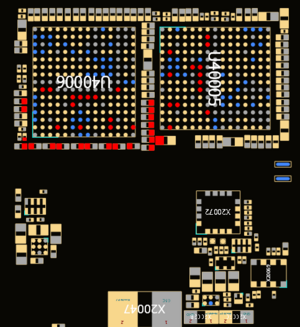
Figure 2. Boardview of the most likely component to be shorted on an iPad 10 with no touch with components connected to one side highlightedFirst you will want to test with a known good digitizer as this will be the most common reason for the touch to not be working. Especially if there are any cracks in the original digitizer
Next do a physical inspection of the two digitizer FPC's (labeled in red in Figure 1) for damage or corrosion. You could also check if these FPC's are bad by pressing down on them with a known good digitizer plugged in and see if touch starts to work. If any damage is found or if pressing down on the FPC(s) gets the touch to work then you will have to fix by replacing the FPC.
Sometimes the FPC on the board will be bowed out which doesn't allow the pins to make good contact with the digitizer FPC and you can fix the problem by just bending the outer edge of the connector back inwards thereby making the connection to the screen more secure.
If the problem is confirmed to not be due to the digitizer or digitizer FPC's then it will likely be due to a short or faulty component on the touch circuit. Most of the common faults will be due to a shorted capacitor or bad touch IC within the area labeled in blue in Figure 1.
There are two shields covering these IC's and components that will need to be removed. They can be removed by using a grinder and snips or by adding low melt solder to the edges of the shield and then hot air station to remove the shields
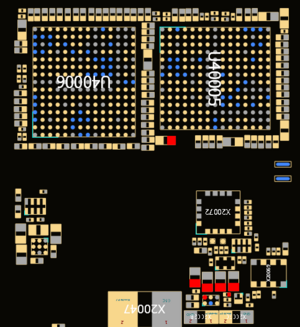
Figure 3. Boardview of the most likely component to be shorted on an iPad 10 with no touch with components connected to one side highlightedAfter removing the shields put your multimeter in diode mode and with your red probe on ground, check for shorts on the components around the two touch IC's with your black probe.
Pay special attention to testing on either side of the filter highlighted in figures 2 and 3. This will likely be the area where you will find a short
If you find a short on any of the shorts around the touch IC or on the filter highlighted in figures 2 and 3 then we can move on to finding the component that is causing the short and the ipad to not respond to touch
Repair Steps
In order to find the shorted cap or component you will need to use a DCPSU and either freeze spray or a thermal camera.
Since we don't know what voltage the line runs at we will have to use the DCPSU set at 1V/1A as injecting this low of a voltage into the board will typically not be enough to cause any damage to low voltage areas but it will still be enough power to heat up the shorted component enough we can see it in a thermal camera or with freeze spray.
With your DCPSU set to 1V/1A place your black probe on ground and red probe to the shorted component we found in the diagnostic steps and watch to see which component heats up.
If you find a capacitor to be heating up (especially if it's any of the caps highlighted in figures 2 or 3) you will just need to remove the faulty cap with a blade or pry tool, and you most likely will not need to replace it with a new one as long as it is a smoothing cap with several other caps connected to the same line.
If one of the touch IC's heats up then you will need to replace it. The touch IC's are BCM15957A0 and can be ordered from most suppliers or found on an ipad 10, iPad Air 4/5, iPad Pro 12.9" 4th gen, or iPad 11" 3rd/4th gen donor board
Once you have removed the shorted capacitor or replaced the faulty touch IC, then test again with a known good digitizer to make sure the problem has been solved