Soldering Iron, Multimeter, Thermal Camera, Rosin, Hot Air Station, Microscope
Difficulty
◉◉◉◉ Specialist
Type
Soldering
Problem description
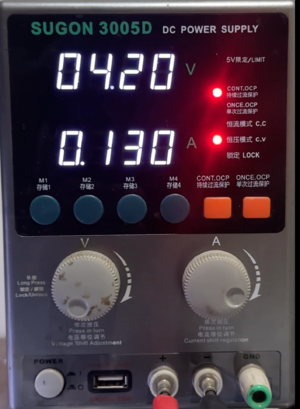
iPhone 15 Pro appears dead and will not turn on or charge when on battery. When connected to a DC Power Supply (DCPS), the device consumes 0.105 A of current before prompt to boot and boots normally after prompt. Thermal imaging shows the charging IC heating abnormally.
Symptoms
Device appears dead, no response to power button or charger.
No charging indication on screen.
Device only boots when connected to DCPS.
Figure 1 - iPhone 15 Pro Max DCPS reading before prompt to boot exampleDCPS reading: 0.105 A before prompt to boot.
Charging IC visibly heats up on a thermal camera.
Diagnostic Steps
Connect iPhone to DC Power Supply; check current draw:
0.105 A pre-boot draw indicates boot sequence initiates.
Attempt to prompt the phone to boot using power button.
Observe thermal camera or use Rosin to detect heat source:
Charging IC heating confirms failure.
Repair Steps
Disassemble Device:
Remove display and disconnect battery.
Board-Level Work:
Remove motherboard from housing.
Split Layers
Isolate charging IC area (use thermal shielding).
Remove Faulty Charging IC:
Use hot air + flux, carefully lift the IC.
Clean and Prepare Pads:
Wick old solder and inspect for pad damage.
Install New Charging IC:
Reball, align, and install.
Test Booting and Charging:
Connect to DCPS, verify normal reading before prompt to boot.