"3" is not in the list (1. Easy, 2. Medium, 3. Hard, 4. Specialist) of allowed values for the "Repair Guide difficulty" property.
Problem description
Muse (2016) does not hold a charge. This is likely the result of a degraded battery.
Example image (Figure 1) -- No image yet. Help expand this page by uploading it!
Symptoms
Battery life less than two hours
Connectivity issues
WARNING: If your battery life is significantly less than expected, your battery may have degraded. If you are unable to get the device repaired, you should dispose of it, as degraded Li-Ion batteries are a fire risk.
Solution
Replace the battery.
Diagnostic Steps
Repair Steps
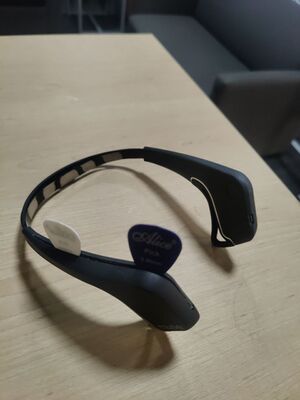
Using two guitar picks to disassemble a Muse (2016)Open the clips covering the circuitry behind the left ear. Use a pick to pry open a gap, and use a second pick to undo the plastic clips. Note that there are clips on the underside, too.
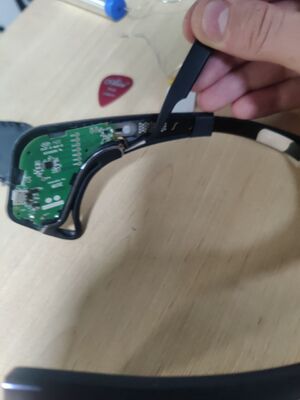
Use tweezers to carefully remove the ear electrode connection.
Using tweezers to remove the ear electrode connection on the Muse (2016)


_2_pick_disassembly.jpg)
_ear_electrode_disconnection.jpg)