
More actions
No edit summary |
Tiago199988 (talk | contribs) |
||
| (2 intermediate revisions by one other user not shown) | |||
| Line 11: | Line 11: | ||
==Device pictures== | ==Device pictures== | ||
<gallery showthumbnails="1"> | <gallery showthumbnails="1"> | ||
File: | File:Miniware ES120.jpg|alt= | ||
</gallery> | </gallery> | ||
==PCB pictures== | ==PCB pictures== | ||
<gallery showthumbnails="1"> | <gallery showthumbnails="1"> | ||
File: | File:Miniware ES120 PCB v1.4A front.jpg|Front side of the ES120 v1.4A PCB | ||
File:Miniware ES120 PCB v1.4A back.jpg|Back side of the ES120 v1.4A PCB | |||
</gallery> | </gallery> | ||
| Line 26: | Line 27: | ||
==More Information/External Sources== | ==More Information/External Sources== | ||
You can manually link to external sources for additional information that might not fit here but are useful such as BIOS image dumps, firmware, etc! | You can manually link to external sources for additional information that might not fit here but are useful such as BIOS image dumps, firmware, etc! | ||
* [https://gitlab.com/XenGi/es120-usb-c-mod USB-C mod] | |||
Latest revision as of 23:55, 1 December 2025
| Miniware ES120 | |
|---|---|
| Manufacturer | Miniware |
| Code name | |
| Release date | |
| Device type | Other |
This article is a stub. You can help Repair Wiki grow by expanding it
Guides
Explanatory Guides
Repair Guides
| Affects part | Type | Difficulty | |
|---|---|---|---|
| Miniware ES120 Screen is on and shows the screw not turning once the motor stops turning repair | Motor | Soldering | 3. Hard |
Create a Guide
Device pictures

PCB pictures
-
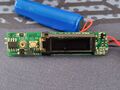
Front side of the ES120 v1.4A PCB
-
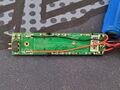
Back side of the ES120 v1.4A PCB


Reference measurements (also schematics if available)
Please consider contributing pictures to this section!
More Information/External Sources
You can manually link to external sources for additional information that might not fit here but are useful such as BIOS image dumps, firmware, etc!