
More actions
(Created page with " '''Pixel 6a Vibration/Haptics Not Working''' <nowiki>**</nowiki> This guide is anecdotal. My phone now has 100% vibration uptime using this repair. If it worked for you, please update with pictures ** The device's haptics do not register notifications, button presses, etc. This guide realigns the pins for a better contact between the motherboard and haptics component. 🔍 '''Step-by-Step Diagnosis''' If your vibration motor is not working, hard reset the phone by...") |
(add pictures) |
||
| (3 intermediate revisions by 2 users not shown) | |||
| Line 1: | Line 1: | ||
{{Repair Guide | |||
|Device=Pixel 6a | |||
|Affects parts=Main Logic Board | |||
|Needs equipment=Screwdrivers, spudger, tweezers | |||
|Type=Teardown | |||
|Difficulty=1. Easy | |||
}} | |||
'''Pixel 6a Vibration/Haptics Not Working''' | '''Pixel 6a Vibration/Haptics Not Working''' | ||
The device's haptics do not register notifications, button presses, etc. This guide realigns the pins for a better contact between the motherboard and haptics component. | The device's haptics do not register notifications, button presses, etc. This guide realigns the pins for a better contact between the motherboard and haptics component. | ||
| Line 28: | Line 32: | ||
'''⚙️ Hardware Solution''' | '''⚙️ Hardware Solution''' | ||
[[File:Pixel6a-vibrator-overview.png|center|thumb|Red circle is over vibrator contacts]] | |||
# Take off the screen and midframe | # Take off the screen and midframe | ||
# | # [[File:Pixal6a-vibrator-bend.jpg|center|thumb|Very gently bend both contacts upwards so that they rest closer to the midframe]] | ||
# | # [[File:Pixel6a-vibrator-bend2.jpg|center|thumb|If needed, slightly bend the contacts on the vibrator downwards so that the pins are closer to the motherboard]] | ||
# You should feel some tension when screwing back the midframe as the pins press against each other. | # You should feel some tension when screwing back the midframe as the pins press against each other. | ||
💬 '''External Discussion for this Issue''' | 💬 '''External Discussion for this Issue''' | ||
Latest revision as of 04:38, 2 October 2025
| Pixel 6a Vibration and Haptics Not Working | |
|---|---|
| Device | Pixel 6a |
| Affects part(s) | Main Logic Board |
| Needs equipment | Screwdrivers, spudger, tweezers |
| Difficulty | ◉◌◌◌ Easy |
| Type | Teardown |
Pixel 6a Vibration/Haptics Not Working
The device's haptics do not register notifications, button presses, etc. This guide realigns the pins for a better contact between the motherboard and haptics component.
🔍 Step-by-Step Diagnosis
If your vibration motor is not working, hard reset the phone by holding down the power button + volume up key for 30 secs.
If the vibration comes back after reboot and dies later, your device may benefit from this guide.
The vibration motor usually dies after quick key presses. Some users say that it dies when connected to a weak cellular connection.
Check for similar kernel logs hinting that the vibration motor is not working
[09-06 20:10:22.074 1222:27231 E/android.hardware.vibrator-cs40l26] Polling error or timeout! (0)
[09-06 20:10:41.948 1222:27563 W/Vibrator] Failed to get state "Haptic"
[09-06 20:07:05.492 1314:1445 E/NotificationVibratorHelper] Error creating vibration waveform with pattern: [0]
[09-06 20:05:03.736 1314:1668 E/VibratorController] Vibrator HAL on failed: Status(-5, EX_ILLEGAL_STATE): ''
💡 Issue with Vibrator Contacts
The vibrator is not firmly attached to the motherboard like other "lego" style connectors. The motherboard has spring loaded pins that press against the vibrator module. After time, I believe the contacts lose their elasticity and make a poor connection, causing many kernel errors. After too many errors, I think the phone locks out the vibrator to prevent further damage to other components.
⚙️ Hardware Solution

- Take off the screen and midframe
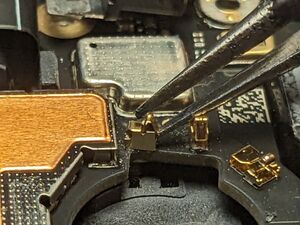
Very gently bend both contacts upwards so that they rest closer to the midframe 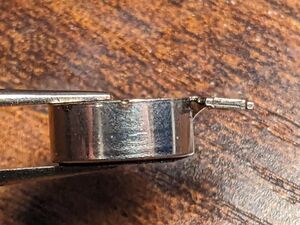
If needed, slightly bend the contacts on the vibrator downwards so that the pins are closer to the motherboard - You should feel some tension when screwing back the midframe as the pins press against each other.


💬 External Discussion for this Issue