
More actions
(iPad Air 5 Device Page) |
MacbookMedic (talk | contribs) m (added compatibility info for cd3217 replacement) |
||
| (10 intermediate revisions by 3 users not shown) | |||
| Line 1: | Line 1: | ||
{{Device page | {{Device page | ||
|Manufacturer=Apple | |||
|Has code name=A2588, A2589, A2591 | |||
|Device release date=2022-03-18 | |||
|Device type=Tablet | |||
}} | }} | ||
{{stub}} | |||
==Guides== | ==Guides== | ||
{{List Guides}} | Apple Logo Flashes on and off on iPad Air 5: | ||
Disconnect the power button flex cable.{{List Guides|CD3217B12 replacement=a2588 iPad air 5: | |||
Successfully replaced CD3217B12 with U3100 from an a2251 Macbook Pro (820-01949).}} | |||
==Device pictures== | ==Device pictures== | ||
<gallery showthumbnails="1"> | <gallery showthumbnails="1"> | ||
File: | File:Ipadair2022-768x768.webp|alt= | ||
</gallery> | </gallery> | ||
==PCB pictures== | ==PCB pictures== | ||
<gallery | <gallery> | ||
File: | File:A2588ConnectorsOverview.png|iPad Air 5 - Connector Overview | ||
File:IPad Air 5 PCB.jpg|alt= | |||
</gallery> | </gallery> | ||
==Reference measurements (also schematics if available)== | ==Reference measurements (also schematics if available)== | ||
=== Diode Mode Readings: === | |||
<gallery showthumbnails="1"> | <gallery showthumbnails="1"> | ||
File: | File:Air5LCDFPCDiode.jpg|#1 LCD connector | ||
File:A2588LowerDigitizerFPCDiode.jpg|#2 Lower digitizer connector (next to LCD connector) | |||
File:A2588UpperDigitizerFPCDiode.jpg|#3 Upper digitizer connector | |||
File:A2588VolumeConnectorDiode.png|#4 Volume button connector | |||
File:A2588RearCameraConnector.jpg|#5 Rear camera connector | |||
File:A2588PowerButtonFPCDiode.jpg|#6 Power button connector (next to rear camera) | |||
File:A2588FrontCameraFPCDiode.jpg|#7 Front camera connector | |||
File:A2588LeftAmbientLightSensorFPCDiode.jpg|#8 Left ambient light sensor connector (below front camera) | |||
File:A2588 iPad Air 5 top mic connector diode readings.jpg|#9 Top mic connector (by front camera) | |||
</gallery> | </gallery> | ||
==More Information/External Sources== | ==More Information/External Sources== | ||
CD3217 Know good ROM dump: https://www.sendspace.com/filegroup/o50KR%2FmFSzssNPV4%2FfMXR%2FabYypKCONhcqYX3llc5ZpMEjLjsYg%2FIrgZTsYR3WPismwz23kyDF0O7ZcGCVfnDg | |||
iPad Air 5 Model Numbers: | |||
A2588 Wi-Fi Only | |||
A2589 Wi-Fi + Cellular | |||
A2591 Wi-Fi + Cellular | |||
Latest revision as of 05:04, 19 January 2026
| IPad Air 5 | |
|---|---|
| Manufacturer | Apple |
| Code name | A2588, A2589, A2591 |
| Release date | 2022-03-18 |
| Device type | Tablet |
This article is a stub. You can help Repair Wiki grow by expanding it
Guides
Apple Logo Flashes on and off on iPad Air 5:
Disconnect the power button flex cable.===Explanatory Guides===
Repair Guides
| Affects part | Type | Difficulty | |
|---|---|---|---|
| How To Program ROM Chip for iPads with CD3217 | Logic Board | Soldering | 4. Specialist |
| How to reprogram the CD32 ROM with Wylie SPI Programmer | motherboard | 4. Specialist | |
| IPad Not Charging Battery Always Reporting 1 Percent Charge | Motherboard | Soldering | 3. Hard |
Create a Guide
Device pictures

PCB pictures
-
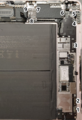
iPad Air 5 - Connector Overview
-
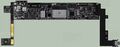


Reference measurements (also schematics if available)
Diode Mode Readings:
-
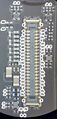
- 1 LCD connector
-
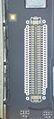
- 2 Lower digitizer connector (next to LCD connector)
-
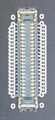
- 3 Upper digitizer connector
-
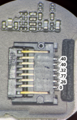
- 4 Volume button connector
-
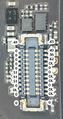
- 5 Rear camera connector
-
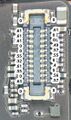
- 6 Power button connector (next to rear camera)
-
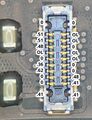
- 7 Front camera connector
-
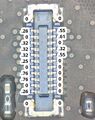
- 8 Left ambient light sensor connector (below front camera)
-
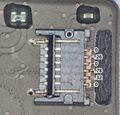
- 9 Top mic connector (by front camera)


More Information/External Sources
CD3217 Know good ROM dump: https://www.sendspace.com/filegroup/o50KR%2FmFSzssNPV4%2FfMXR%2FabYypKCONhcqYX3llc5ZpMEjLjsYg%2FIrgZTsYR3WPismwz23kyDF0O7ZcGCVfnDg
iPad Air 5 Model Numbers:
A2588 Wi-Fi Only
A2589 Wi-Fi + Cellular
A2591 Wi-Fi + Cellular