
More actions
HaileyKitty (talk | contribs) (→Device pictures: added photos and info) |
Tiago199988 (talk | contribs) |
||
| (4 intermediate revisions by 3 users not shown) | |||
| Line 12: | Line 12: | ||
==Device pictures== | ==Device pictures== | ||
<gallery showthumbnails="1"> | <gallery showthumbnails="1"> | ||
File: | File:300px-Model.png|Display model | ||
File:LG Ultrafine 5k 27MD5KA-B.webp|alt= | |||
</gallery> | </gallery> | ||
| Line 39: | Line 40: | ||
Cable issues: https://discussions.apple.com/thread/252555535 | Cable issues: https://discussions.apple.com/thread/252555535 | ||
Francis ( | Francis (fronke_ on discord): These are my own observations, but a quick google shows others having similar issues. | ||
I have had 3 identical models in for "not starting". | I have had 3 identical models in for "not starting". | ||
| Line 47: | Line 48: | ||
Display 2: Test mode works, replacing TPS65983 has not fixed it. | Display 2: Test mode works, replacing TPS65983 has not fixed it. | ||
Display 3: Test mode does not work, fuse "F100" faulty, not fixed yet (as of Jan 30, 2023, currently no updates) | Display 3: Test mode does not work, fuse "F100" faulty, not fixed yet (as of Jan 30, 2023, currently no updates). | ||
'''Display 2''' '''Update''' (2024-01-23): Ended up replacing the entire motherboard, display now works normally. The motherboards seem hard to come by. | |||
Latest revision as of 22:24, 14 September 2025
| LG Ultrafine 5k 27MD5KA-B | |
|---|---|
| Manufacturer | LG |
| Code name | |
| Release date | 2017-04-20 |
| Device type | Television/Monitor |
This article is a stub. You can help Repair Wiki grow by expanding it
Guides
Explanatory Guides
Repair Guides
| Affects part | Type | Difficulty | |
|---|---|---|---|
| LG Ultrafine 5k 27MD5KA-B Display completely unresponsive repair | Logic Board | Soldering | 3. Hard |
| LG Ultrafine 5k 27MD5KA-B Display completely unresponsive test mode fails repair | PSU | Part replacement | 1. Easy |
| LG Ultrafine 5k 27MD5KA-B Randomly going to sleep or doesnt wake up repair | Logic Board | Soldering | 3. Hard |
Create a Guide
Device pictures
-

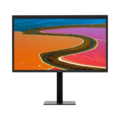
Display model
-


PCB pictures
Please consider contributing pictures to this section!
Reference measurements (also schematics if available)
Please consider contributing pictures to this section!
More Information/External Sources
This model seems to have a prone-to-dying Texas Instruments USB-C PD + Thunderbolt multiplexer controller "TPS65983" as ive seen two (suspecting 3) models with it being the cause of the display not working. Issue can stem from other places as well, like power supply (fuses etc).
How to use test mode:
-
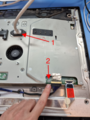
Location of the button, make sure power is plugged in while testing. 1. power plug 2. test mode button
-

What the display should show if test mode works


External references and other people having issues:
People complaining about loose main port: https://maker.pro/forums/threads/lg-ultrafine-27md5ka-b-provides-power-to-laptop-but-does-not-get-detected-by-computer-no-video.292861/
Cable issues: https://discussions.apple.com/thread/252555535
Francis (fronke_ on discord): These are my own observations, but a quick google shows others having similar issues.
I have had 3 identical models in for "not starting".
Display 1: Test mode works, fixed by replacing TPS65983.
Display 2: Test mode works, replacing TPS65983 has not fixed it.
Display 3: Test mode does not work, fuse "F100" faulty, not fixed yet (as of Jan 30, 2023, currently no updates).
Display 2 Update (2024-01-23): Ended up replacing the entire motherboard, display now works normally. The motherboards seem hard to come by.